

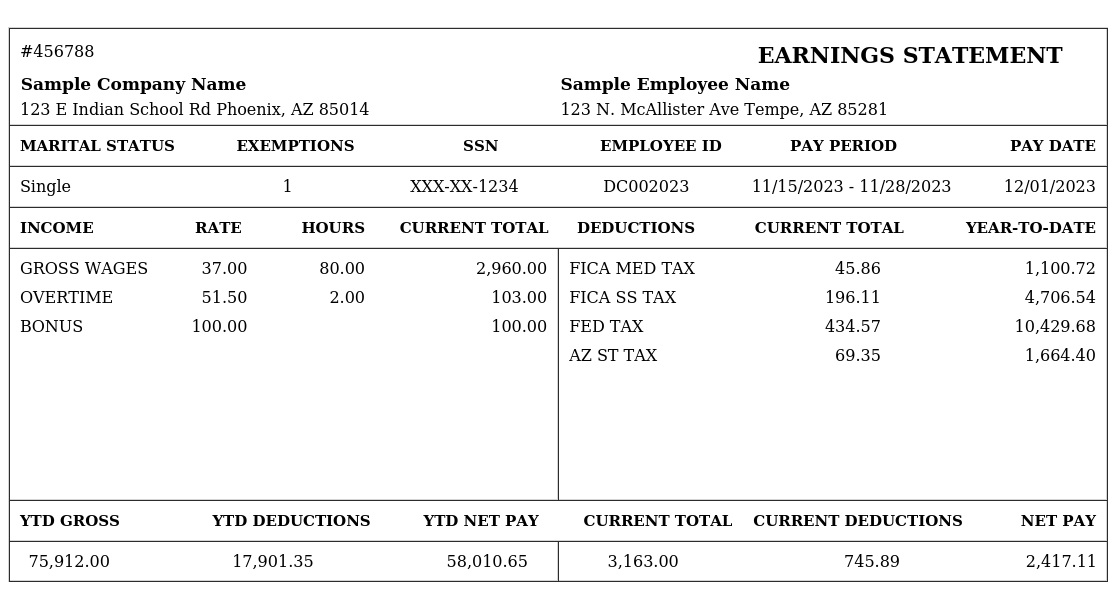
A paystub generator can make payroll administration much easier for employers, freelancers, contractors, and small businesses that need clear records of earnings and deductions. In the United Kingdom, the term “payslip” is more commonly used than “paystub,” but both refer to documentation that explains how an employee’s pay has been calculated.
Creating payslips manually can take time and increase the possibility of calculation or formatting errors. A reliable paystub generator can help organise salary information, earnings, deductions, tax details, and net pay into a professional document that employees can easily understand.
What Is a Paystub Generator?
A paystub generator is a digital tool designed to create an earnings statement based on information entered by the employer or payroll administrator. Depending on the software, it can calculate or display gross pay, deductions, taxes, pension contributions, employee details, payment periods, and final take-home pay.
In the UK, a paystub generator may be marketed as a payslip generator. The terminology differs, but the purpose is similar: producing a clear record showing how an employee’s pay was calculated for a particular pay period.
A good generator should make the document easy to read while keeping important payroll information organised. It should also allow users to review the figures before issuing the final payslip.
Why Use a Paystub Generator for UK Payroll?
Payroll can become complicated when a business has multiple employees, different pay rates, overtime, bonuses, pension deductions, tax adjustments, or varying payment schedules. A paystub generator can simplify the process by giving payroll administrators a consistent format for recording salary information.
It can also reduce the amount of repetitive administrative work. Instead of creating every payslip from scratch, users can enter the relevant payroll information and generate a professional document much faster.
For small businesses without a large payroll department, this convenience can be particularly valuable. A well-designed tool can help maintain consistent payroll records while giving employees a straightforward explanation of their earnings.
What Information Should a UK Payslip Contain?
A UK payslip generally needs to provide enough information for an employee to understand their pay. This can include the employee’s name, pay period, gross earnings, deductions, and final net amount.
The document may also show the employee’s National Insurance details or number where appropriate, along with information about tax deductions and other payroll adjustments. Depending on the employee’s circumstances, the payslip can contain additional details relating to pension contributions, overtime, bonuses, commissions, or statutory payments.
The exact information required can depend on employment circumstances and current UK payroll rules. Businesses should therefore ensure that their payroll process remains aligned with applicable requirements rather than relying solely on a generic paystub generator.
How Does a Paystub Generator Work?
Most paystub generator tools follow a straightforward process. The user enters employee information, payment dates, salary or hourly earnings, and applicable deductions. The software then arranges the information into a structured payslip.
Some advanced payroll systems can calculate tax, National Insurance, pension contributions, and other deductions automatically. Simpler generators may primarily create the document from figures that the user provides.
After entering the information, the user should carefully review the generated payslip. Payroll figures should always be checked before the document is provided to an employee, particularly when calculations involve overtime, bonuses, tax changes, or multiple deductions.
Paystub Generator for Salaried Employees
A paystub generator can be useful for employees receiving a fixed annual salary. The annual salary can be converted into the relevant pay-period amount according to the employee’s payroll schedule.
For example, an employee paid monthly may have their annual salary divided across the appropriate monthly periods before deductions are applied. The payslip can then show gross earnings, deductions, and net pay for that particular period.
Although salaried payroll can appear straightforward, changes such as unpaid leave, bonuses, salary adjustments, pension contributions, or statutory payments can affect the final amount. These details should be reflected accurately.
Paystub Generator for Hourly Workers
Hourly employees often have more variable earnings because their pay depends on the number of hours worked. A paystub generator can help present regular hours, overtime, hourly rates, and additional earnings clearly.
This can be particularly helpful when employees work different shifts or receive varying amounts from one pay period to another. A detailed payslip allows the employee to see how their gross earnings were calculated before deductions.
Employers should maintain accurate working-hour records and verify the information entered into the generator. A professionally formatted payslip cannot correct inaccurate payroll data.
Understanding Gross Pay, Deductions and Net Pay
One of the most important purposes of a payslip is explaining the difference between gross pay and net pay. Gross pay is the amount earned before applicable deductions, while net pay is the amount the employee receives after deductions have been taken into account.
Deductions can include income tax, National Insurance, pension contributions, student loan repayments, or other authorised deductions depending on the employee’s circumstances.
A good paystub generator should present these figures clearly rather than simply displaying the final amount. Employees should be able to understand why their take-home pay differs from their gross earnings.
Choosing the Right Paystub Generator
When choosing a paystub generator, businesses should look beyond appearance. Accuracy, ease of use, privacy, record keeping, and suitability for UK payroll are important considerations.
A tool designed specifically for UK users can be preferable because UK payroll terminology and requirements differ from those used in other countries. A US-focused “paystub” service, for example, may not be appropriate for creating UK payslips.
Businesses should also consider whether they need a simple document generator or a complete payroll system. A generator may be sufficient for basic document creation, while larger organisations may benefit from payroll software that handles calculations, employee records, reporting, and compliance-related processes.
Paystub Generator and Payroll Accuracy
A paystub generator can improve consistency, but the quality of the final document depends on the accuracy of the information entered. Incorrect salary figures, tax information, payment dates, or deductions can result in an inaccurate payslip.
For this reason, payroll information should be reviewed carefully before generating and issuing a final document. Employers should also keep appropriate payroll records and update their processes when payroll rules change.
Businesses dealing with complex payroll situations may need dedicated payroll software or professional payroll support rather than relying on a basic generator alone.
Is a Paystub Generator Suitable for Small Businesses?
For many small businesses, a paystub generator can be a convenient way to produce professional-looking payroll documents without creating a complicated payroll workflow.
It can be particularly useful for businesses with a small number of employees and relatively straightforward payroll requirements. The time saved on document formatting can allow business owners to focus on other administrative responsibilities.
However, employers remain responsible for ensuring that payroll information is accurate and that their overall payroll process meets applicable requirements. A generator should be treated as a payroll tool, not a replacement for proper payroll management.
Protecting Payroll and Employee Information
Payslips contain personal and financial information, so privacy should be taken seriously. Businesses should choose tools that provide appropriate security and should avoid entering sensitive employee information into unknown or poorly maintained services.
Generated payslips should also be stored and shared securely. Employers should limit access to payroll information to people who genuinely need it and follow appropriate data protection practices.
Security is especially important when payroll documents are downloaded, emailed, uploaded to cloud storage, or accessed from shared computers.
Paystub Generator vs Complete Payroll Software
A paystub generator primarily focuses on creating an earnings document, while complete payroll software can manage a much broader payroll process. Depending on the system, payroll software may handle employee records, calculations, reporting, pension information, tax processes, and payment preparation.
For a business with straightforward requirements, a generator may provide enough functionality. Growing businesses may eventually need a more comprehensive payroll solution as the number of employees and payroll complexities increase.
The best choice depends on the size of the organisation, payroll requirements, budget, and level of automation needed.
Conclusion
A paystub generator can be a practical tool for creating clear and professional UK payslips without spending unnecessary time on manual formatting. It can help employers organise earnings, deductions, payment information, and net pay into an easy-to-understand document.
However, generating a professional payslip is only one part of responsible payroll management. Businesses should verify all figures, protect employee information, maintain appropriate records, and make sure their payroll processes remain consistent with current UK requirements.
For small businesses and employers looking for a convenient way to prepare payroll documents, a suitable paystub generator can provide a useful combination of speed, consistency, and convenience.
FAQs
What is a paystub generator?
A paystub generator is a digital tool that creates an earnings statement containing information such as gross pay, deductions, and net pay. In the UK, this type of document is more commonly called a payslip.
Is a paystub generator the same as a payslip generator?
Generally, the terms describe similar tools. “Payslip generator” is the more common UK terminology, while “paystub generator” is widely used in other markets.
Can I use a paystub generator in the UK?
Yes, a paystub generator can be used to prepare UK payroll documents, provided the tool is suitable for UK payroll information and the resulting payslip contains the appropriate details for the employee’s circumstances.
Can a paystub generator calculate UK tax?
Some advanced payroll tools can calculate UK tax and other deductions, while basic generators may require the user to enter the figures manually. Always verify calculations before issuing a payslip.
Can a paystub generator create payslips for hourly employees?
Yes. Many generators can accommodate hourly wages by using information such as hours worked, hourly rates, overtime, and additional earnings.
Is a paystub generator useful for small businesses?
A paystub generator can be useful for small businesses that need a convenient way to create consistent payroll documents. It can reduce manual formatting and administrative work.
Does a paystub generator replace payroll software?
Not necessarily. A basic generator mainly creates payslips, whereas full payroll software can manage calculations, employee records, reporting, and other payroll functions.
Are generated payslips legally valid in the UK?
A generated payslip can serve as an official payroll document when it accurately reflects the employee’s pay and contains the information required for the employee. The employer remains responsible for payroll accuracy and compliance.
How can I make a professional payslip?
Use accurate employee and payroll information, clearly separate earnings from deductions, show the relevant payment period, and review every figure before issuing the document.
Should I keep copies of generated payslips?
Employers should maintain appropriate payroll and employment records in accordance with applicable UK requirements. Secure storage is important because payslips contain personal and financial information.