


A Days Between Dates Calculator helps you find the exact number of days between two calendar dates in seconds. Enter a start date and an end date to calculate the date difference without manually counting every day on a calendar. You can use it to track deadlines, plan holidays, measure project durations, calculate waiting periods or find how many days have passed since an important event. The result depends on whether you count the starting date, the ending date or both, so understanding inclusive and exclusive counting helps you get the answer you need.
Calculating the difference between dates may seem simple, but different months have different lengths, and leap years add an extra day to February. A reliable calculator handles these details automatically. This guide explains how date differences work, how to calculate them manually and when to use calendar days instead of working days.
What Is a Days Between Dates Calculator?
A Days Between Dates Calculator is an online tool that measures the number of calendar days separating two dates. You select a start date and an end date, and the calculator determines the difference between them.
For example, you might want to know how many days remain until your holiday, how long you have worked on a project or how much time has passed since a particular event. Instead of counting dates individually, the calculator processes the calendar automatically.
Most date calculators return the difference in days. Some also show the duration in weeks, months and days. However, calendar months have different lengths, so a result expressed in months may depend on the calculator’s counting method.
How to Use the Days Between Dates Calculator
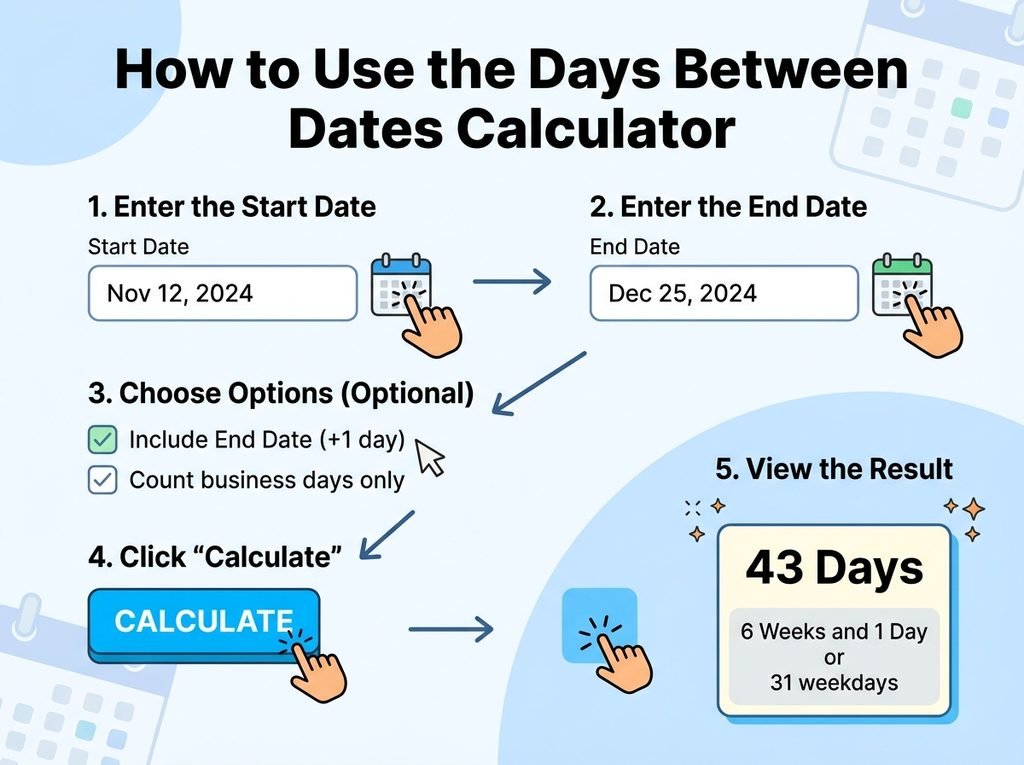
Using a Days Between Dates Calculator is straightforward. First, choose the starting date you want to measure from. This could be the date an event began, a deadline was announced or a journey started.
Next, enter the ending date. This is the date you want to measure towards. The calculator compares both dates and returns the number of days between them.
Check whether the result excludes the starting date or includes both dates. For instance, the difference between 10 October and 15 October is five days when you measure the elapsed time. If you count both 10 October and 15 October as calendar dates, the total is six days.
Always confirm the counting method when you use the result for an important deadline, contract or formal calculation.
How to Calculate the Number of Days Between Two Dates
The Basic Date Difference Formula
The basic formula is:
Number of days = End date − Start date
This formula measures the elapsed calendar days between two dates. In practice, you cannot subtract the day numbers alone when the dates fall in different months or years. You must account for the complete calendar.
For example, the difference between 5 March and 12 March is seven days. Subtracting 5 from 12 gives the correct result because both dates fall within the same month.
Now consider 28 March and 4 April. March has 31 days, so three days pass from 28 March to 31 March, followed by four days to 4 April. The total difference is seven days.
Calculating Dates Across Different Months
When the dates fall in different months, count the remaining days in the first month and add the days in the following months until you reach the ending date.
Suppose your start date is 25 January and your end date is 5 February in a non-leap year. There are six elapsed days from 25 January to 31 January, followed by five days to 5 February. The total difference is eleven days.
A calculator performs this process automatically, which reduces the chance of mistakes. It also makes longer date ranges much easier to calculate.
Calculating Dates Across Different Years
Date calculations become more complicated when the dates span several months or years. You must account for each month’s length and any leap years in the interval.
For example, the difference between 20 December and 10 January of the following year is 21 days. This includes eleven elapsed days from 20 December to 31 December and ten more days to 10 January.
For longer periods, an online calculator is usually more convenient than manual counting. It handles month boundaries, year changes and leap days without requiring you to calculate each part separately.
Does the Days Between Dates Calculator Include Both Dates?
This is one of the most important details when calculating a date difference. The result can change depending on whether you count elapsed days or every calendar date touched by the period.
Exclusive counting measures the elapsed time between two dates. If you start on 1 October and finish on 7 October, the difference is six days.
Inclusive counting counts both the starting and ending dates. The same period covers seven calendar dates, from 1 October through 7 October.
Neither method is automatically correct for every situation. Elapsed-time calculations generally use the exclusive difference, while some attendance records, event schedules and date ranges require inclusive counting.
If you need an inclusive total, add one day to the exclusive difference when the start date and end date are the same dates or fall in chronological order. For formal deadlines, follow the rules that apply to your particular situation.
What Is the Difference Between Calendar Days and Working Days?
Calendar days include every day of the week, including Saturdays, Sundays and public holidays. A period from Monday to the following Monday contains seven elapsed days.
Working days usually refer to weekdays, Monday through Friday, excluding weekends. However, the exact definition depends on the organisation, country or calculation involved. Public holidays may also need to be excluded.
A standard Days Between Dates Calculator generally measures calendar days unless it specifically offers a working-day option. This distinction matters when estimating delivery times, calculating business deadlines or planning annual leave.
For example, a delivery estimate of five working days may cover more than five calendar days if a weekend falls within the period. If public holidays apply, the wait may be longer still.
How Leap Years Affect Date Calculations
A leap year contains 366 days rather than the usual 365. February has 29 days during a leap year, adding one extra calendar day to the year.
Leap years usually occur every four years. However, century years must also be divisible by 400 to qualify. For example, 2000 was a leap year, while 1900 was not.
These rules matter when your date range includes 29 February. A calculation that ignores leap years can produce an incorrect result over longer periods.
A reliable Days Between Dates Calculator accounts for leap years automatically. You do not need to adjust the result manually when your selected dates cross February or span multiple years.
When Should You Use a Days Between Dates Calculator?
Planning Holidays and Travel
A date calculator helps you measure the time until a holiday, trip or special event. You can also use it to work out the length of a planned stay.
For example, enter your arrival and departure dates to determine the elapsed calendar days between them. Check your accommodation booking rules separately, because nights booked and calendar days counted are not always the same.
Tracking Deadlines and Projects
Project managers, students and professionals can use a date calculator to measure the time between a start date and a deadline. This makes it easier to plan milestones and estimate how much time remains.
However, a calendar-day result does not automatically represent the number of working days available. Consider weekends, bank holidays and any non-working periods before setting a schedule.
Counting Days Since an Event
You can calculate how many days have passed since a birthday, anniversary, appointment or other memorable event. Enter the event date as the starting date and today’s date as the ending date.
The same approach works in reverse when you want to know how many days remain until a future occasion. Make sure you select the correct year, especially when the event occurs annually.
Personal and Administrative Planning
Date differences can help you track subscription periods, notice periods, application windows and other time-based tasks. They can also support personal planning, such as measuring a fitness challenge or counting days between milestones.
For legal, financial or official deadlines, do not rely on a simple calendar-day result alone. Specific rules may exclude certain days, move deadlines that fall on weekends or use a defined starting point.
Common Mistakes When Counting Days Between Dates
One common mistake is counting both dates when the task requires elapsed days. This usually creates a difference of one day. Check whether your calculation needs inclusive or exclusive counting before using the result.
Another mistake is forgetting that months have different lengths. February has 28 or 29 days, while April, June, September and November have 30. Other months have 31 days, so manual calculations can become confusing.
People also confuse calendar days with working days. A five-day calendar period may include a weekend, while five working days generally do not. Finally, entering the wrong year can change the result substantially, particularly when the range spans several years.
Conclusion
A Days Between Dates Calculator offers a quick and dependable way to measure the time between two calendar dates. It handles different month lengths, year changes and leap years, helping you avoid the mistakes that often occur with manual counting.
For the most accurate result, enter both dates carefully and decide whether you need elapsed days or an inclusive count. If your calculation involves working days, public holidays or official deadlines, check the relevant rules as well. With the correct dates and counting method, you can plan events, track deadlines and measure time more confidently.
FAQs
How do I calculate the days between two dates?
Enter your start date and end date into a Days Between Dates Calculator. The tool calculates the elapsed calendar days between them, accounting for month lengths and leap years. Check whether you need an inclusive count before using the result.
Does the Days Between Dates Calculator count the start date?
A standard date difference usually excludes the starting date and measures elapsed days. If you need to count both the start and end dates, use an inclusive calculation. For dates in chronological order, this normally means adding one day to the standard difference.
Can I calculate days between dates in different years?
Yes. Enter the complete start and end dates, including their years. The calculator accounts for the months, year changes and leap days between them, making it easier to calculate longer periods accurately.
Does the calculator include weekends and public holidays?
A standard calendar-day calculator includes Saturdays, Sundays and public holidays. To exclude weekends or holidays, use a working-days calculator that supports the relevant calendar and holiday rules.
How many days are there between two dates in a leap year?
The answer depends on the dates you select. A leap year contains 366 days, and February has 29 days. If your date range includes 29 February, that extra day affects the total difference.
Can I use a Days Between Dates Calculator for deadlines?
Yes, it can help you measure the calendar days between a starting date and a deadline. However, official, legal or business deadlines may follow special rules for weekends, public holidays and inclusive counting. Check the applicable requirements before relying on the result.
For more updates visit: CALCIQ


