


A Working Days Calculator helps you find the number of working days between two dates without counting every day on a calendar. It is useful for calculating project deadlines, annual leave, delivery estimates, payroll periods and business schedules. Most working day calculations exclude Saturdays and Sundays, while some also exclude UK bank holidays. The exact result depends on your start date, end date and counting method. Understanding these details helps you avoid deadline errors and plan your time more accurately.
Working days are not always the same as calendar days. A period of ten calendar days might contain only six or eight weekdays, depending on where the dates fall. Public holidays and company-specific schedules can reduce the total further. This guide explains how working days are calculated, how to use a calculator and which details you should check before relying on the result.
What Is a Working Days Calculator?
A Working Days Calculator counts the days that qualify as working days within a selected date range. It usually excludes weekends and may also remove public holidays, depending on the settings.
For example, if you need to know how many weekdays fall between two dates, the calculator can return the answer in seconds. You do not need to mark each weekday manually or work through a calendar.
The tool is useful for employees, employers, freelancers, students, project managers and business owners. Anyone who needs to estimate a deadline or calculate a period of work can benefit from a reliable working day count.
How Does a Working Days Calculator Work?
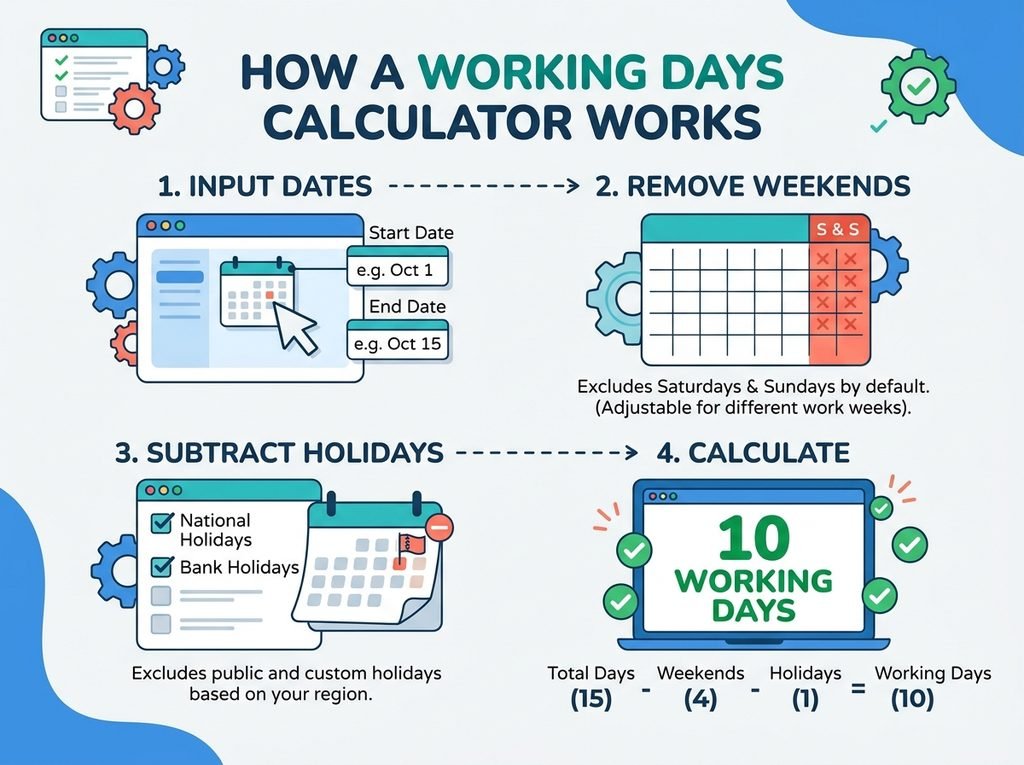
A working days calculator uses your selected start date and end date to identify the days within the period. It then counts the days that match your chosen working schedule.
In a standard Monday-to-Friday schedule, Saturdays and Sundays do not count as working days. If the calculator supports public holidays, it can also exclude the holidays that fall on weekdays.
However, different calculators may treat the start date and end date differently. Some include both dates, while others calculate the days strictly between them. Always check the counting method to ensure the result matches your needs.
Example of Counting Working Days
Imagine you want to count working days from Monday to Friday in the same week. If both dates are included, the result is five working days.
Now consider a date range from Friday to the following Monday. When both dates are included, the range contains two working days: Friday and Monday. Saturday and Sunday are excluded.
These examples show why the selected dates matter. A short calendar period can include very different numbers of working days depending on which weekdays it covers.
Working Days vs Calendar Days
Calendar days include every day of the week, including Saturdays, Sundays and public holidays. Working days usually refer to the weekdays on which a business operates.
Suppose a task takes seven calendar days. That means seven consecutive days have passed, regardless of whether they include a weekend. If the task takes seven working days, the finish date may be later because weekends are normally excluded.
This distinction is important for deliveries, contracts, refunds, administrative processes and project schedules. A company that promises a response within five working days may not include Saturday, Sunday or qualifying public holidays in its estimate.
Always check the wording of the relevant policy or agreement. Some services operate on weekends, and some deadlines use calendar days rather than working days.
How to Calculate Working Days Manually
You can calculate working days without a tool if the date range is short. First, identify the start and end dates. Then count each weekday within the range while excluding Saturdays and Sundays.
Next, identify any public holidays that your calculation should exclude. In the UK, the applicable bank holidays depend on the country and sometimes the location. England and Wales, Scotland and Northern Ireland do not always share identical holiday dates.
Finally, check whether the first and last dates should count. This step is especially important when calculating notice periods, delivery windows and contract deadlines. If you are unsure, use the rule specified by the organisation or agreement involved.
Manual counting can work for simple periods, but longer ranges are easier to calculate with a Working Days Calculator. A tool reduces repetitive counting and makes it easier to compare different date ranges.
Should You Exclude UK Bank Holidays?
That depends on what you want to calculate. A basic working days calculator may exclude weekends only, while a more detailed version may allow you to remove bank holidays as well.
For example, a weekday that falls on a bank holiday may still appear in a simple Monday-to-Friday count. If your workplace is closed that day, you may need to exclude it for a more realistic estimate of available working time.
The UK does not have one identical bank holiday calendar for every region. Scotland and Northern Ireland have some different holidays from England and Wales. Local arrangements and employer policies can also affect whether a particular date counts as a working day.
For accurate results, choose the relevant UK holiday calendar if the calculator provides one. If it does not, check the applicable holiday dates separately and adjust the result. Do not assume every business closes on every bank holiday.
Common Uses of a Working Days Calculator
Project Planning and Business Deadlines
Project managers often need to estimate how many working days remain before a milestone. A working days calculator helps them schedule tasks, allocate resources and set realistic delivery dates.
It can also help teams estimate completion dates when work pauses over weekends. However, the result should reflect the team’s actual operating schedule, including any planned closures or non-working days.
Annual Leave and Employee Scheduling
Employees may use a working days calculator to understand how many weekdays fall within a holiday period. Employers can also use it when organising staff rotas or reviewing absence dates.
However, counting weekdays does not automatically determine how much annual leave an employee must use. Workplace policies may treat public holidays, part-time schedules and contracted working days differently.
For example, an employee who normally works Tuesday to Saturday may need a different calculation from someone who works Monday to Friday. Always use the person’s actual schedule rather than assuming a standard five-day week.
Delivery and Processing Times
Businesses often estimate shipping, processing or service periods in working days. A calculator helps customers understand when an order or request might be completed.
Still, working day estimates are not guarantees. Delays, regional holidays, weekends and operational schedules can affect the actual delivery or response date. Check the provider’s terms when a deadline is important.
Payroll and Administrative Tasks
Working day counts can help with payroll planning, invoice processing and administrative schedules. They may also help businesses estimate how many weekdays fall within a reporting period.
Nevertheless, working days are not always the same as paid days or payable hours. Payroll calculations may depend on employment contracts, shift patterns, overtime rules and statutory requirements.
Why Can Working Days Calculator Results Differ?
Two calculators may produce different answers for the same dates because they do not always use the same rules. One may include both the start and end dates, while another may exclude one or both.
The weekend definition can also change the result. A standard UK office schedule usually treats Saturday and Sunday as non-working days, but some industries operate on different days.
Bank holiday settings create another difference. A calculator that excludes weekends only may return more working days than one that also excludes public holidays.
Finally, some tools allow custom work schedules, while others assume a Monday-to-Friday week. Before using a result for a formal deadline, confirm that the calculator’s rules match your situation.
Tips for Getting an Accurate Working Day Count
Start by entering the correct dates and checking whether the calculator includes the first and last day. A small difference in the date range can change the total, especially for short periods.
Next, confirm the working schedule. If you work shifts or have a non-standard week, a basic weekday calculator may not reflect your actual working days.
Then decide whether bank holidays should be excluded. For UK calculations, select the appropriate regional calendar if available, or account for the relevant holidays separately.
Finally, distinguish between a count of working days and a deadline calculation. Knowing that a period contains ten working days does not always identify the due date unless you also know how the first day is treated and whether any holidays apply.
Conclusion
A Working Days Calculator makes it easier to count weekdays between dates and plan deadlines without manually checking every day. It can support project schedules, annual leave planning, delivery estimates and business administration.
For accurate results, check whether weekends and UK bank holidays are excluded, whether both dates are included and whether the calculator matches your normal work schedule. These details matter because working days and calendar days are not interchangeable. By choosing the right counting method, you can plan more confidently and avoid unnecessary confusion over dates and deadlines.
FAQs
What does a Working Days Calculator calculate?
A Working Days Calculator counts qualifying working days within a selected date range. Most tools exclude Saturdays and Sundays, while some also exclude public holidays or allow a custom work schedule.
Does a working days calculator include the start and end dates?
That depends on the calculator. Some include both dates when they fall on working days, while others count only the days between them. Check the tool’s settings before using the result for a deadline.
Are UK bank holidays included in working days?
A basic calculator may count a bank holiday if it falls on a weekday. A calculator with UK bank holiday settings can exclude applicable holidays, but you should select the correct regional calendar.
What is the difference between working days and business days?
The terms are often used interchangeably to describe days when businesses operate, usually Monday to Friday. However, some organisations follow different schedules, so the exact definition depends on the workplace or service.
How many working days are in a typical week?
A standard Monday-to-Friday schedule contains five working days. However, shift workers and businesses operating at weekends may follow different schedules, and public holidays can reduce the number of working days in a particular week.
Can I use a Working Days Calculator to find a deadline?
Yes. You can use it to count working days between dates or help estimate a completion date. For an official deadline, confirm the applicable rules for start dates, public holidays, weekends and any specific contractual or legal requirements.
For more updates visit: CALCIQ


