


An Age Calculator of Baby helps parents find out exactly how old their baby is in days, weeks, months and years. Instead of counting dates manually, you can use a baby’s date of birth and the current date to work out their age quickly. This information is useful when tracking developmental milestones, preparing for health visitor appointments, recording feeding and sleep patterns, and understanding age-based guidance. For example, a baby born on 1 September will be four weeks old on 29 September in a non-leap year, making a calculator a convenient way to check their age without confusion.
Knowing your baby’s exact age can be especially helpful during the first year, when development changes rapidly. However, weeks and calendar months are not interchangeable. A baby who is four weeks old has reached 28 days, while one calendar month after birth may fall 28, 29, 30 or 31 days later. Understanding this difference helps you record your baby’s age accurately and interpret milestone guidance more confidently.
What Is an Age Calculator of Baby?
An Age Calculator of Baby is a simple online tool that calculates the time between your baby’s birth date and a selected date. Most calculators show the result in days, weeks, months and years, depending on the baby’s age and the tool’s features.
You usually need to enter your baby’s date of birth and choose the date on which you want to calculate their age. The calculator then works out the difference between the two dates. Some tools also let you calculate a baby’s age on a future date, which can help when planning appointments or family events.
The main benefit is accuracy and convenience. Instead of manually counting weeks across different months, you can get a clear result in seconds. This is particularly useful for newborns, whose age is often recorded in days or completed weeks rather than whole months.
How to Calculate Your Baby’s Age
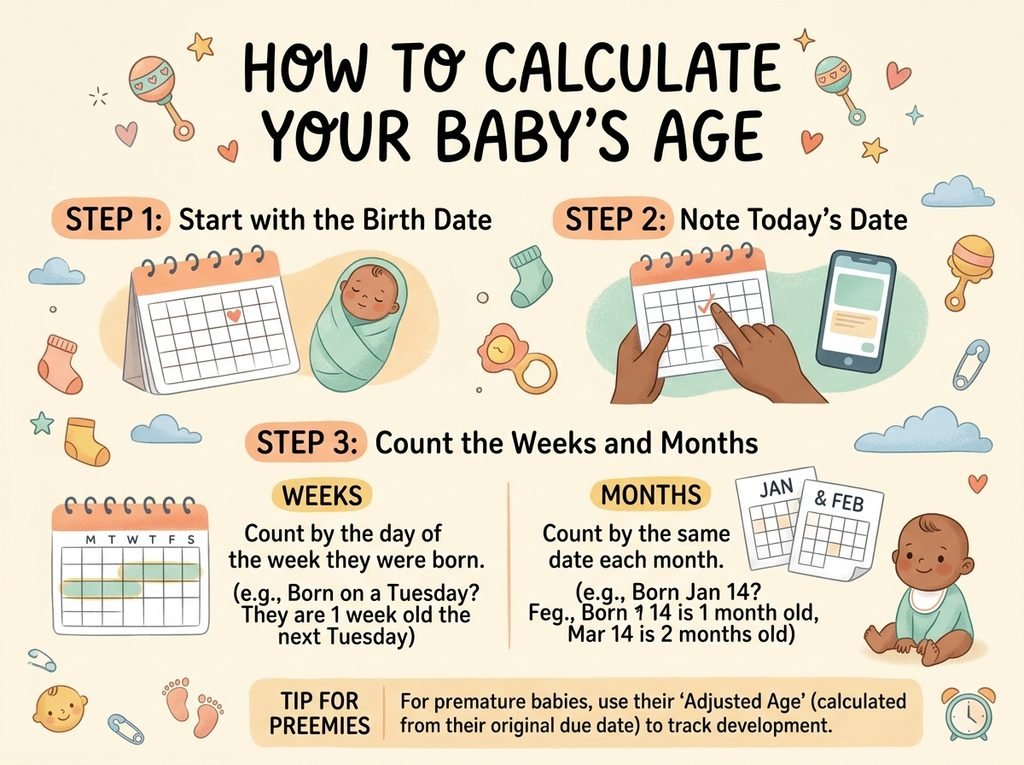
Enter the Date of Birth
Start by entering your baby’s full date of birth, including the day, month and year. Check the date carefully before calculating, as an incorrect birth date will produce an incorrect result.
If your baby was born close to midnight, use the official recorded date of birth. Most standard age calculators work with calendar dates rather than the exact time of birth. As a result, they may not calculate your baby’s precise age in hours.
Select the Calculation Date
Next, select today’s date or another date on which you want to know your baby’s age. For example, you might want to check how old your baby will be at their next health visitor appointment.
The calculator compares the birth date with the selected date. It then displays the elapsed time between them in the units it supports.
Read the Result
A baby’s age may be displayed as days, completed weeks, calendar months or a combination of these units. Each measurement provides a different way to understand the same period.
For example, a baby who is 42 days old has completed six weeks. A baby who is 60 days old has completed eight weeks and four days. Showing the result in both days and weeks can make age tracking easier during early infancy.
How to Calculate Baby Age in Days, Weeks and Months
Baby Age in Days
Calculating age in days is straightforward. Count the number of calendar days that have passed since your baby was born. For example, if your baby was born on 1 October and you calculate their age on 11 October, they are 10 days old.
This calculation measures elapsed time, so the birth date itself is not counted as a full day. Your baby reaches one day old after 24 hours have passed from birth, although a date-only calculator may show the change according to calendar dates rather than exact birth time.
Age in days is useful for recording a newborn’s early progress and discussing feeding, weight or other concerns with a healthcare professional.
Baby Age in Weeks
To convert a baby’s age from days into weeks, divide the total number of elapsed days by seven. The whole-number result gives the number of completed weeks, while the remainder gives additional days.
For example, 35 days divided by seven equals five weeks. If your baby is 38 days old, they have completed five weeks and three days.
Parents often use weeks during the first few months because development can change noticeably over short periods. However, not every milestone happens on a fixed day or week. Babies develop at different rates, so use age calculations as a guide rather than a strict timetable.
Baby Age in Months
Months require a slightly different calculation because calendar months have different lengths. A calendar month after birth is based on the corresponding date in the following month, where that date exists.
For example, a baby born on 10 January reaches one calendar month on 10 February. The number of days between those dates is 31, but the baby’s calendar age is still one month.
This distinction matters when tracking monthly birthdays. Dividing a baby’s age in days by 30 can provide a rough estimate, but it does not always give the correct calendar age. A reliable calculator should use calendar dates when reporting months.
Why Is Tracking Your Baby’s Exact Age Important?
Understanding Developmental Milestones
Parents often track age to understand when babies may begin showing particular skills. These can include smiling socially, responding to sounds, holding their heads more steadily, reaching for objects and becoming more aware of their surroundings.
Milestone guidance usually describes a range rather than an exact deadline. Your baby’s age can help you understand the guidance, but it cannot determine whether development is healthy on its own.
If you have concerns about your baby’s development, speak with your health visitor or GP. They can consider your baby’s individual progress and advise whether further assessment is appropriate.
Preparing for Health Visitor Appointments
An accurate age helps when discussing your baby’s growth, feeding, sleep and development with a health visitor. It also makes it easier to maintain a consistent record of appointments and observations.
You can use the calculator to check your baby’s age on the day of an appointment rather than relying on memory. Keeping a written record of important dates can also help you share clear information with healthcare professionals.
Following Age-Based Guidance
Some recommendations depend on a baby’s age, including guidance about feeding, sleep safety and routine health checks. Knowing the correct age can help you find the relevant information.
However, an age calculator does not replace medical advice. Always follow guidance from qualified healthcare professionals, especially if your baby was born prematurely or has specific medical needs.
Baby Age Calculator for Premature Babies
Premature babies are born before 37 completed weeks of pregnancy. When discussing their development, healthcare professionals may consider both their chronological age and their corrected age.
Chronological age is the time since birth. Corrected age adjusts for how early a baby was born compared with a full-term pregnancy. For example, if a baby is eight weeks old but was born four weeks early, their corrected age is approximately four weeks.
Corrected age may be useful when discussing developmental expectations during early childhood. However, its use depends on the situation and the advice of your baby’s healthcare team. A standard Age Calculator of Baby usually calculates chronological age unless it specifically includes a corrected-age feature.
Common Mistakes When Calculating Baby Age
One common mistake is treating four weeks as exactly one calendar month. Four weeks equal 28 days, but a calendar month can contain 28, 29, 30 or 31 days. This difference can cause confusion when comparing a baby’s age in weeks with their monthly milestones.
Another mistake is entering the wrong date format. Some tools use day/month/year, while others use month/day/year. Check the displayed date carefully to make sure the calculator interprets your baby’s birthday correctly.
Parents may also assume that every milestone should happen on a specific date. In reality, development varies between children. An age calculator provides a time measurement, not a developmental assessment.
Finally, remember that most date-based calculators do not account for the exact time of birth. If you need an age in hours for a medical reason, ask your healthcare professional rather than relying on a basic online calculator.
How to Choose a Reliable Baby Age Calculator
Choose a calculator that is easy to use and clearly displays its results. It should let you enter a birth date and a calculation date without unnecessary steps.
A useful tool should distinguish between completed weeks and calendar months. This reduces confusion when recording your baby’s age for appointments or personal notes. It should also handle different month lengths and leap years correctly.
Privacy is another consideration. Your baby’s birth date is personal information, so review how a website handles information entered into its tools. Avoid providing unnecessary personal details when calculating age.
Most importantly, use the result for practical age tracking rather than medical diagnosis. A calculator can make date calculations easier, but questions about feeding, symptoms or development should be discussed with a qualified professional.
Conclusion
An Age Calculator of Baby makes it easy to find your baby’s age in days, weeks and months. By entering the correct birth date and calculation date, you can track age accurately without counting every day manually.
Understanding the difference between completed weeks and calendar months helps prevent common mistakes. It can also make milestone records and health visitor appointments easier to manage. If your baby was born prematurely, remember that corrected age may also be relevant when discussing development.
Use a baby age calculator as a practical tracking tool, and seek professional advice whenever you have concerns about your baby’s health or progress.
FAQs
How do I calculate my baby’s exact age?
Enter your baby’s date of birth and the date you want to calculate their age on. The calculator measures the elapsed time between those dates and displays the result in the units it supports, such as days, weeks and months.
Can I calculate my baby’s age in weeks?
Yes. Divide the number of elapsed days by seven to find completed weeks. For example, 49 days equals seven completed weeks. A baby age calculator can perform this calculation automatically.
Is four weeks the same as one month for a baby?
No. Four weeks equals 28 days, while a calendar month may contain 28, 29, 30 or 31 days. Your baby reaches one calendar month on the corresponding date in the following month, where that date exists.
How many days old is my baby?
Your baby’s age in days depends on the birth date and the date you choose for the calculation. Enter both dates into the calculator to find the elapsed number of days. Date-only tools may not account for the exact time of birth.
Can I use an age calculator for a premature baby?
Yes. A standard calculator can find your baby’s chronological age, which is the time since birth. If your baby was premature, a healthcare professional may also use corrected age when discussing development.
Is a baby age calculator accurate?
A well-designed calculator can accurately calculate the difference between two dates when you enter them correctly. However, the result depends on how the tool handles calendar months, leap years and time of birth. It does not assess your baby’s health or development.
For more updates visit: CALCIQ


