

Keeping track of working hours can become difficult when your schedule changes each day. Different start times, lunch breaks, overtime, and flexible shifts can make manual calculations confusing.
A work hours calculator makes this process much easier. It helps you find the total time you worked between two times while accounting for unpaid breaks.
Whether you work a regular office schedule, flexible shifts, or hourly jobs, accurate time tracking can help you understand your weekly hours. It can also make payroll and overtime calculations easier.
What Is a Work Hours Calculator?
A work hours calculator is a time-based tool that calculates how long you worked during a specific period. You normally enter your starting time, ending time, and break duration.
The calculator then determines your total working time. For example, if you work from 9:00 AM to 5:00 PM and take a one-hour unpaid lunch break, your actual work time is seven hours.
This simple calculation can save time when you need to track several shifts.
A work hours calculator can also help when your working day crosses noon or midnight. It reduces the need to calculate hours manually.
How Does a Work Hours Calculator Work?
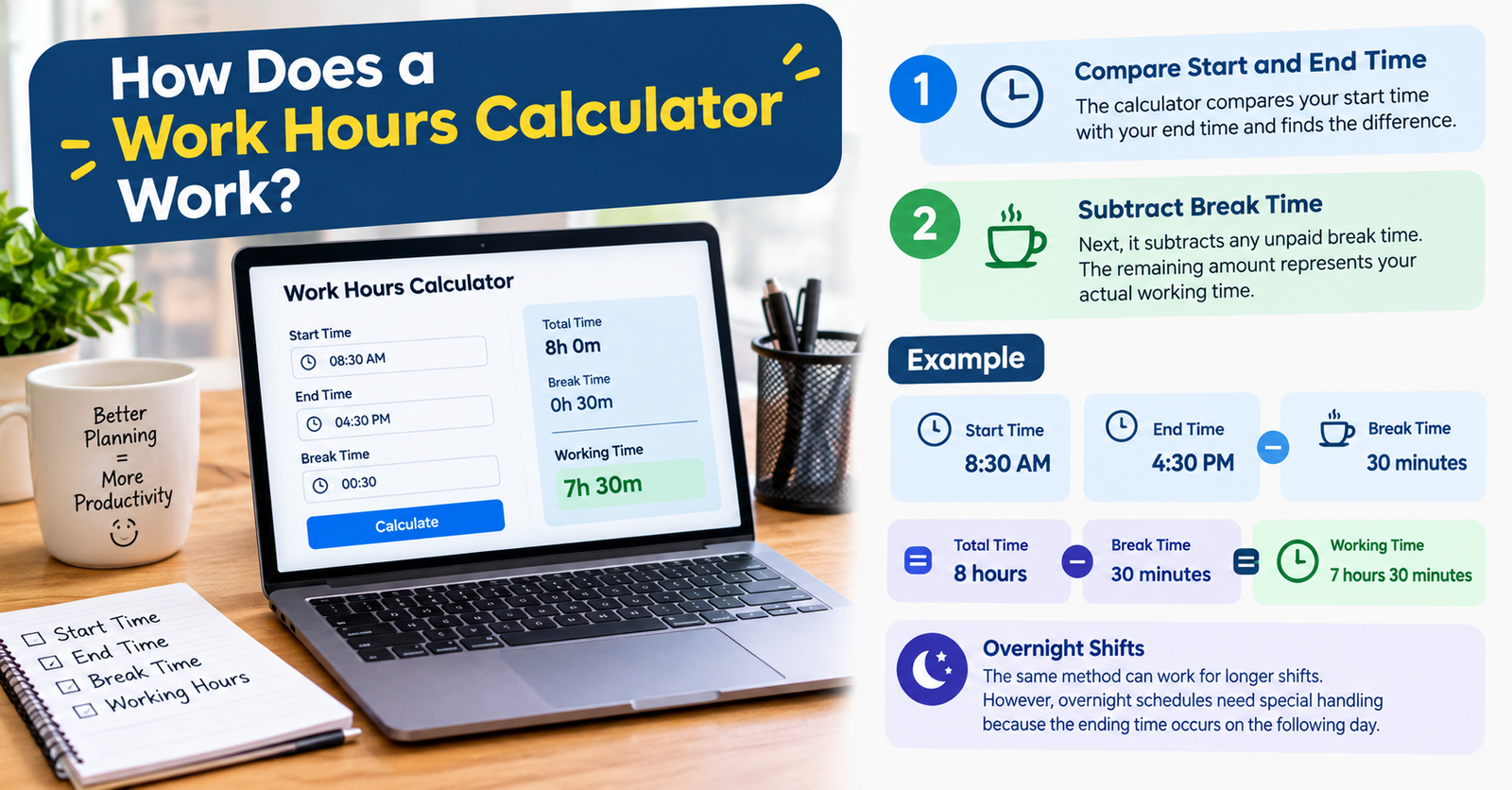
The basic process is simple. The calculator compares your start time with your end time and finds the difference.
Next, it subtracts any unpaid break time. The remaining amount represents your actual working time.
For example, suppose you start work at 8:30 AM and finish at 4:30 PM. Your total time at work is eight hours.
If you take a 30-minute unpaid break, your working time becomes seven hours and 30 minutes.
The same method can work for longer shifts. However, overnight schedules need special handling because the ending time occurs on the following day.
How to Calculate Work Hours Manually
You can calculate work hours without a tool by following the same basic principle.
First, determine the total time between your start and finish. Then subtract unpaid breaks.
For example, imagine you start at 7:45 AM and finish at 4:15 PM. The total time between those points is eight hours and 30 minutes.
If you take a 45-minute unpaid break, subtract that break from the total. Your final working time is seven hours and 45 minutes.
This approach works well for individual shifts. However, calculating several days manually can take much longer.
A work hours calculator can handle these calculations quickly and reduce common time-entry mistakes.
Why Accurate Work Hours Matter
Accurate time tracking matters for both employees and employers. It gives you a clearer picture of how much time you spend working.
For hourly workers, recorded hours can affect payroll. Incorrect entries may lead to missing or extra hours on a paycheck.
Work records can also help you understand your weekly schedule. You may notice that some weeks contain more hours than others.
Tracking time is especially useful when your schedule includes overtime, split shifts, or changing start times.
Calculating Weekly Work Hours
Many employees need to calculate more than one working day. In that case, you can add the hours from each shift to find your weekly total.
Suppose you work eight hours on Monday, seven and a half on Tuesday, eight on Wednesday, and eight and a half on Thursday. You can add those daily totals to find the combined amount.
A work time calculator can make this process easier when each day has different hours.
Weekly totals are useful for reviewing your schedule and checking whether your recorded hours match your payroll records.
They can also help you understand how much time you spend working during a typical week.
Work Hours and Breaks
Breaks can affect your final working time. The key difference is whether the break counts as paid working time.
If a break is unpaid, you normally subtract it from the total time between your start and finish. If it is paid, it may remain part of your recorded work time.
For example, an employee works from 9:00 AM to 5:30 PM with a one-hour unpaid lunch. The total time at the workplace is eight and a half hours.
After removing the unpaid lunch, the working time becomes seven and a half hours.
Always use the break rules that apply to your employment arrangement when reviewing your hours.
Calculating Overtime Hours
Overtime calculations can become more complicated because the rules depend on the applicable workplace arrangement and location.
A calculator can still help you determine the total number of hours worked. You can then compare that total with the overtime threshold that applies to you.
For example, if you work additional hours beyond your normal schedule, those hours can be separated from your regular working time for review.
However, total work hours and overtime pay are not the same thing. Pay rates, eligibility rules, and overtime requirements can vary.
Therefore, use your recorded hours as the starting point rather than assuming every extra hour receives an overtime rate.
Overnight and Flexible Shifts
Some work schedules cross midnight. These shifts can make manual calculations more difficult.
For example, an employee might start at 10:00 PM and finish at 6:00 AM the next morning.
The shift lasts eight hours before considering any breaks. A calculator that supports overnight schedules can handle this situation more easily.
Flexible schedules can create similar challenges. Employees may begin at different times each day and work different numbers of hours.
Using consistent time entries helps keep these calculations accurate.
Common Mistakes When Calculating Work Hours
One common mistake is forgetting to subtract an unpaid break. This can make the recorded working time higher than the actual hours worked.
Another mistake involves confusing AM and PM. A single incorrect time can significantly change the final result.
Overnight shifts can also cause problems when the date changes at midnight. Manual calculations may accidentally produce a negative or incorrect duration.
Rounding times can create another issue. If you record approximate times instead of actual start and finish times, small differences can accumulate across several days.
For better accuracy, record your actual working times and apply the correct break information.
Who Can Use a Work Hours Calculator?
A work hours calculator can be useful for many types of workers. Hourly employees can use one to review their daily and weekly hours.
Freelancers can also track time spent on different projects. Contractors may use working-hour records when preparing invoices or reviewing project time.
Employers and managers can use time calculations to review schedules and understand staffing requirements.
Students with part-time jobs can also benefit from tracking their work schedules.
The tool is most useful when working hours change regularly or when several shifts need to be added together.
Work Hours Calculator for Payroll Tracking
Accurate time records can make payroll reviews easier. Employees can compare their recorded working hours with the hours shown on their pay statements.
If there is a difference, the employee can review the original time entries and break periods.
A calculator does not determine whether a payroll amount is legally correct. Instead, it provides a clear calculation of the time entered.
This distinction is important because payroll can involve taxes, overtime rules, paid breaks, deductions, and other factors.
How to Get More Accurate Results
Start by recording the exact time you begin and finish work. Avoid estimating whenever possible.
Next, enter unpaid breaks separately. Make sure the calculator uses the correct time format.
If you work overnight, confirm that the tool supports shifts that cross midnight.
Finally, review your result before using it for payroll or other important records.
Keeping consistent records throughout the week can make the final calculation much easier.
Conclusion
A work hours calculator provides a simple way to calculate working time without relying on manual calculations.
It can help you track daily shifts, subtract unpaid breaks, calculate weekly hours, and review overnight schedules. It can also make time records easier to understand.
For accurate results, enter your start time, finish time, and break duration carefully. Remember that calculating working hours is different from determining overtime pay or final payroll.
When used consistently, a work hours calculator can make everyday time tracking faster and more convenient.
FAQs
What is a work hours calculator?
A work hours calculator calculates the amount of time worked between a starting time and an ending time. It can also account for unpaid breaks.
How do I calculate my work hours?
Find the time between your start and finish, then subtract unpaid breaks. The remaining time represents your actual working hours.
Does a work hours calculator subtract lunch breaks?
Many calculators allow you to enter a break duration. An unpaid lunch can then be subtracted from the total time.
Can I calculate weekly work hours?
Yes. You can calculate each day’s working time and add the daily totals together. Some tools can also calculate multiple shifts directly.
Can I use a work hours calculator for overnight shifts?
Yes, if the calculator supports shifts that cross midnight. Enter the starting and ending times accurately so the duration is calculated correctly.
Does a work hours calculator calculate overtime pay?
Not necessarily. A calculator can determine total hours, but overtime pay depends on applicable rules, eligibility, and pay rates.
For more updates visit: CALCIQ



Comments 1