


The Casio advanced scientific calculator fx-115ES is designed for students and users who need more than basic arithmetic. It supports a wide range of mathematical calculations in a compact format.
The fx-115ES family includes functions for fractions, powers, roots, trigonometry, statistics, complex numbers, matrices, and vectors. The later fx-115ES PLUS models also use Casio’s Natural Textbook Display to make expressions easier to read.
For students studying advanced mathematics, the calculator can reduce the time needed for repetitive calculations. It can also help users check working and explore mathematical expressions without relying on a phone or computer.
What Is the Casio Advanced Scientific Calculator fx-115ES?
The Casio advanced scientific calculator fx-115ES is a non-programmable, non-graphing scientific calculator. The original fx-115ES uses a 96 × 31 dot LCD display and combines solar power with a button battery.
The model belongs to Casio’s advanced scientific calculator range. It is aimed at calculations that go beyond everyday arithmetic.
The fx-115ES can handle several mathematical modes. These include statistics, complex numbers, matrices, and vectors. This makes it useful for subjects where standard scientific functions are not enough.
Key Features of the fx-115ES
Natural Textbook Display
One of the most useful features of the later fx-115ES PLUS models is Natural Textbook Display. It allows fractions, roots, logarithms, and other expressions to appear in a format similar to printed maths.
This can make calculations easier to enter and check. Casio explains that Natural Display represents expressions in a form similar to how they appear on paper or in a maths book.
For example, fractions can appear vertically rather than as a simple slash expression. This can help reduce input mistakes when working with complex formulas.
Scientific and Trigonometric Calculations
The calculator supports common scientific functions, including trigonometric, inverse trigonometric, exponential, logarithmic, and hyperbolic calculations.
Users can also switch between degrees, radians, and grads. Choosing the correct angle mode is important when working with trigonometry.
This makes the calculator suitable for many school, college, engineering, and science calculations.
Fractions, Roots and Powers
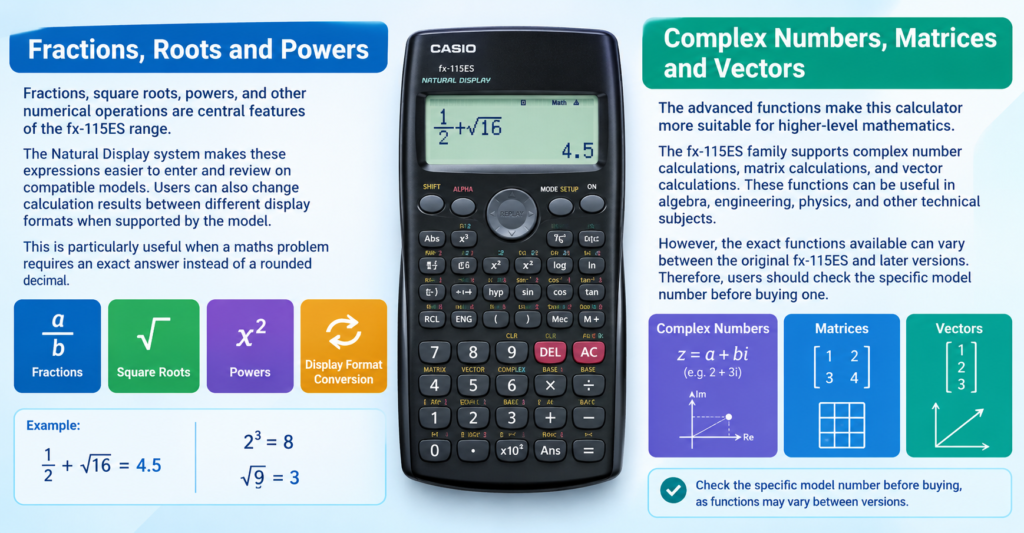
Fractions, square roots, powers, and other numerical operations are central features of the fx-115ES range.
The Natural Display system makes these expressions easier to enter and review on compatible models. Users can also change calculation results between different display formats when supported by the model.
This is particularly useful when a maths problem requires an exact answer instead of a rounded decimal.
Complex Numbers, Matrices and Vectors
The advanced functions make this calculator more suitable for higher-level mathematics.
The fx-115ES family supports complex number calculations, matrix calculations, and vector calculations. These functions can be useful in algebra, engineering, physics, and other technical subjects.
However, the exact functions available can vary between the original fx-115ES and later versions. Therefore, users should check the specific model number before buying one.
Power and Battery System
The original Casio fx-115ES uses a two-way power system. It combines a built-in solar cell with a G13-type LR44 button battery. Casio states that the battery should generally be replaced at least every three years.
This design can be useful for students because the calculator does not rely entirely on a replaceable battery for everyday operation.
The calculator also includes automatic power-off functionality. The original model switches off after around six minutes without an operation.
Is the fx-115ES Suitable for Students?
The Casio advanced scientific calculator fx-115ES can suit students who need advanced mathematical functions without a graphing calculator.
It can support work involving algebra, trigonometry, statistics, complex numbers, matrices, vectors, and scientific calculations. The exact suitability depends on the student’s course and examination rules.
In the UK, exam requirements can vary by qualification and awarding body. Students should therefore check the calculator rules for their specific exam before taking any model into an examination.
How to Use the fx-115ES Effectively
Start by learning the calculator’s basic modes before moving to advanced functions. Understanding the setup menu can prevent common errors.
Pay particular attention to the angle setting. A trigonometric calculation can produce an unexpected answer if the calculator is set to radians instead of degrees.
ALSO READ:NJ Sales Tax Calculator Calculate New Jersey Sales Tax
Natural Display can also help you check expressions before calculating them. If a formula looks different from your written working, review the input rather than assuming the calculator is incorrect.
Memory functions can save time during longer calculations. However, it is still useful to write important intermediate values down when working through multi-step problems.
Original fx-115ES vs Later Versions
The name fx-115ES covers a family of related calculators, so model numbers matter.
The original fx-115ES has its own specifications and manual. Later models, such as the fx-115ES PLUS and fx-115ES PLUS 2nd Edition, add or change certain features. Casio’s current documentation describes the fx-115ES PLUS 2nd Edition as a non-programmable, non-graphing model with Natural Textbook Display and 10 + 2 digits.
Therefore, do not assume that every calculator carrying the fx-115ES name has exactly the same functions.
This distinction is especially important when buying a used calculator or replacing an older model.
What Can You Calculate With It?
The calculator can handle much more than basic addition, subtraction, multiplication, and division.
Depending on the exact version, users can work with scientific notation, fractions, logarithms, trigonometric functions, statistics, complex numbers, matrices, vectors, and other advanced mathematical operations.
It can therefore serve as a practical tool for students working across several areas of mathematics and science.
Conclusion
The casio advanced scientific calculator fx-115ES remains a useful reference point in Casio’s advanced scientific calculator range. Its combination of scientific functions, mathematical modes, memory features, and two-way power makes it more capable than a basic calculator.
Later fx-115ES PLUS versions add Natural Textbook Display and other improvements. However, specifications can differ between generations.
Before purchasing one, check the exact model number and confirm that its functions meet your course or examination requirements. For everyday advanced mathematics, the fx-115ES family provides a practical alternative to relying on calculator apps.
FAQs
Is the Casio fx-115ES a scientific calculator?
Yes. The fx-115ES is an advanced scientific calculator designed for mathematical and scientific calculations. It is non-programmable and non-graphing.
Is the Casio fx-115ES programmable?
No. The fx-115ES is a non-programmable calculator. Later fx-115ES PLUS models also retain a non-programmable design.
Does the fx-115ES have a Natural Textbook Display?
The later fx-115ES PLUS models feature Natural Textbook Display. The original fx-115ES has a different display specification, so users should check the exact model.
Can the fx-115ES calculate fractions?
Yes. The calculator supports fraction calculations. Compatible models can display fractions using a natural mathematical format.
Can the fx-115ES calculate complex numbers?
Yes. Complex number calculations are supported within the fx-115ES family. The exact operation and available modes depend on the specific version.
Can the fx-115ES calculate matrices and vectors?
Yes. Later fx-115ES models support matrix and vector calculations. These functions make the calculator useful for more advanced mathematics and technical subjects.
For more updates visit: CALCIQ


