

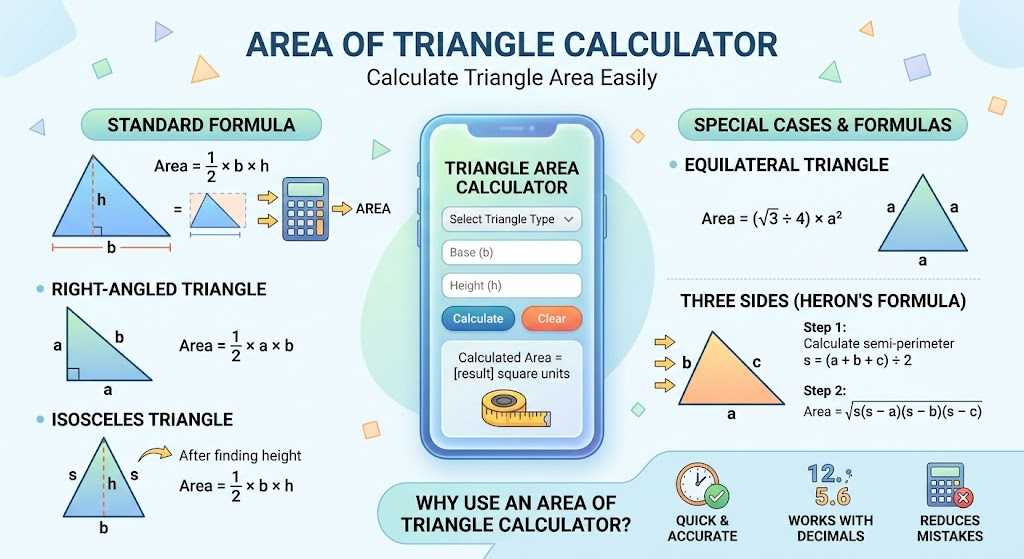
An area of triangle calculator makes it easy to find the area of a triangle when you know the required measurements. Instead of working through the formula manually, you can enter the values and get the result quickly.
The area of a triangle depends on its base and perpendicular height. However, different situations may require different methods. For example, you may know three sides but not the height. In that case, Heron’s formula can help you find the area.
Whether you are studying geometry, checking homework, solving a practical measurement problem, or working with dimensions, understanding how triangle area is calculated can help you check your results with confidence.
What Is an Area of Triangle Calculator?
An area of triangle calculator is a mathematical tool that calculates the area inside a triangle using known measurements. The most common method uses the triangle’s base and perpendicular height.
The standard formula is simple because a triangle covers half the area of a rectangle with the same base and height. The calculation therefore divides the product of the base and height by two.
You can use an area of triangle calculator to reduce manual calculations and quickly check whether your answer is correct.
How to Calculate the Area of a Triangle
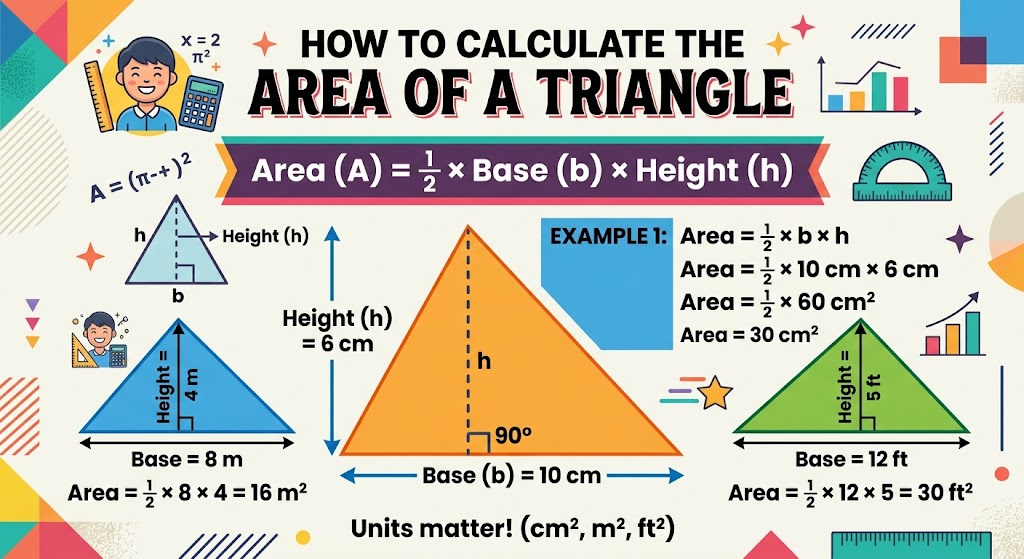
The standard formula for the area of a triangle is:
Area = ½ × base × height
The base is the selected side of the triangle. The height is the perpendicular distance from that base to the opposite vertex.
For example, suppose a triangle has a base of 10 cm and a perpendicular height of 6 cm. Multiply 10 by 6 to get 60. Then divide 60 by 2.
The area is therefore 30 cm².
It is important to use the perpendicular height rather than simply measuring another side. A sloping side is not necessarily the height of the triangle.
Triangle Area Formula
The basic triangle area formula works for many common geometry problems. You only need two measurements: the base and its corresponding perpendicular height.
Area = (base × height) ÷ 2
The units used for the base and height should match. If both measurements are in metres, the area will be expressed in square metres. If they are in centimetres, the result will be in square centimetres.
For instance, a triangle with a base of 8 m and a height of 5 m has an area of 20 m². The calculation is 8 × 5 ÷ 2.
How an Area of Triangle Calculator Works
An area of triangle calculator applies the appropriate mathematical formula to the measurements you provide. With the standard method, the calculator multiplies the base by the perpendicular height and then divides the result by two.
The process is useful when measurements contain decimals or larger numbers. A calculator can also reduce arithmetic mistakes during repeated calculations.
However, the calculator still depends on accurate measurements. If the base or height is incorrect, the final area will also be incorrect.
Calculating the Area When You Know Three Sides
Sometimes you do not know the perpendicular height. Instead, you may know the lengths of all three sides. In this situation, Heron’s formula can be used when the three side lengths form a valid triangle.
First, calculate the semi-perimeter:
s = (a + b + c) ÷ 2
The area can then be found using:
Area = √[s(s − a)(s − b)(s − c)]
Here, a, b, and c represent the three side lengths.
For example, consider a triangle with side lengths of 5 cm, 6 cm, and 7 cm. The semi-perimeter is 9 cm. Substituting the values into Heron’s formula gives an area of approximately 14.7 cm².
This method is particularly useful when the height is not available.
Area of an Equilateral Triangle
An equilateral triangle has three equal sides and three equal angles. Its area can be calculated when you know the length of one side.
The formula is:
Area = (√3 ÷ 4) × side²
For example, if each side measures 6 cm, square the side length to get 36. Multiply 36 by √3 and divide by 4.
The resulting area is approximately 15.59 cm².
An area of triangle calculator can handle this calculation without requiring you to work through the square root manually.
Area of a Right-Angled Triangle
A right-angled triangle contains one 90-degree angle. Its two sides forming the right angle can be used as the base and height.
The formula remains:
Area = ½ × base × height
Suppose the two perpendicular sides measure 9 cm and 4 cm. Multiply them together and divide by two.
The area is 18 cm².
Because the two perpendicular sides are easy to identify, right-angled triangles are often among the simplest triangles for calculating area.
Area of an Isosceles Triangle
An isosceles triangle has two sides of equal length. Its area can still be calculated using the standard base and height formula if the perpendicular height is known.
When only the equal sides and base are known, you may need to calculate the height first. The
of an isosceles triangle can make this possible by dividing the triangle into two right-angled triangles.
Once the perpendicular height has been found, use half of the base multiplied by the height to determine the area.
Why the Units Matter
Triangle area is always expressed in square units because area measures a two-dimensional space.
For example, measurements in centimetres produce an answer in square centimetres, written as cm². Measurements in metres produce m².
Do not confuse linear units with square units. A result of 25 cm is a length, while 25 cm² represents an area.
If the base and height use different units, convert them to the same unit before calculating the area. This prevents incorrect results caused by mixing measurements.
Common Mistakes When Finding Triangle Area
One of the most common mistakes is forgetting to divide the base multiplied by the height by two. A triangle occupies half the area of a rectangle with the same base and perpendicular height.
Another mistake is using the wrong height. The height must meet the chosen base at a right angle. It is not always one of the triangle’s visible sides.
Using inconsistent units can also produce an incorrect answer. Convert measurements into matching units before applying the formula.
Finally, check whether the measurements actually form a valid triangle when using three side lengths. Not every combination of three lengths can make a triangle.
Why Use an Area of Triangle Calculator?
An area of triangle calculator is useful because it provides a quick way to verify calculations. Students can use it when checking geometry exercises, while professionals may use similar calculations for measurements, design, construction, or planning.
It is also helpful when working with decimal measurements. Manual calculations involving several decimal places can take longer and increase the chance of arithmetic errors.
The calculator does not replace understanding the formula. Instead, it provides a convenient way to apply the correct method and check the result.
Understanding Triangle Area in Real Life
Triangle area calculations appear in many practical situations. Architects and designers may need them when working with triangular sections of buildings or structures.
Land measurements can also involve triangular plots or sections of property. In addition, construction projects may require area calculations for materials and surfaces.
Even everyday projects can involve triangle measurements. Examples include calculating the surface area of triangular panels, signs, garden sections, or decorative designs.
Conclusion
An area of triangle calculator provides a quick and convenient way to determine the space inside a triangle. For most basic problems, the calculation uses half of the base multiplied by the perpendicular height.
When the height is unavailable but three side lengths are known, Heron’s formula provides another method. Special triangle types, such as equilateral and right-angled triangles, also have useful formulas that can make calculations easier.
Understanding the underlying formula is still important. It helps you choose the correct measurements, use the right units, and recognise whether a calculator result makes sense.
FAQs
What is the formula for the area of a triangle?
The standard formula is Area = ½ × base × height. The height must be perpendicular to the selected base.
How does an area of triangle calculator work?
An area of triangle calculator uses the appropriate triangle area formula based on the measurements entered. For a standard triangle, it multiplies the base by the perpendicular height and divides the result by two.
Can I calculate triangle area without knowing the height?
Yes. If you know all three side lengths, you can use Heron’s formula to calculate the area. The three lengths must form a valid triangle.
What is the area of a triangle with a base of 10 and height of 5?
Using the formula ½ × 10 × 5 gives an area of 25 square units.
Why do I need to divide by two?
A triangle can be viewed as half of a rectangle with the same base and perpendicular height. Dividing the product of the base and height by two therefore gives the triangle’s area.
Can an area of triangle calculator use decimal measurements?
Yes. Decimal values can be used for the base, height, or side lengths. The resulting area will depend on the units and precision of the measurements.
For more updates visit: CALCIQ



Comments 1